How Much RAM for a Local LLM on Mac? Model Sizes
Not "how fast is your Mac" — how much memory it has. That single number decides which local models you can run, and the answer is more generous than most people expect right up until it isn't.
You can run a local LLM on a Mac with 8 GB of unified memory. The model changes as memory increases; the table gives the engine's current general-purpose pick for each tier.
Quick answer: how much memory for a local LLM?
Use your Mac's installed unified memory, not its free disk space. A 36 GB Mac uses the 32 GB row; 128 GB and larger Macs use the 96 GB policy tier.
| Unified memory | Recommended alias | Command | Good for |
|---|---|---|---|
| 8 GB | lfm2.5-2.6b-4bit |
rapid-mlx serve lfm2.5-2.6b-4bit |
Chat and tools; avoid coding |
| 16 GB | qwen3.5-4b-4bit |
rapid-mlx serve qwen3.5-4b-4bit |
Everyday chat and code |
| 24 GB | bonsai-27b-2bit |
rapid-mlx serve bonsai-27b-2bit |
Larger text-only tasks |
| 32/36 GB | qwen3.8-27b-4bit |
rapid-mlx serve qwen3.8-27b-4bit |
General work and code |
| 48 GB | qwen3.8-27b-4bit |
rapid-mlx serve qwen3.8-27b-4bit |
General work with headroom |
| 64 GB | qwen3.8-27b-4bit |
rapid-mlx serve qwen3.8-27b-4bit |
General work with headroom |
| 96/128+ GB | qwen3.8-27b-4bit |
rapid-mlx serve qwen3.8-27b-4bit |
General work with more headroom |
These are the engine's defaults. See best local LLM by RAM for how to choose between the general-purpose and fast picks, MacBook Pro model comparisons for measured alternatives, and the model catalog for other tasks.
More choices by memory
For image input, tool calls and reasoning, Bonsai 2 uses 2-bit Hadamard weights. On an 8 GB Mac, try rapid-mlx serve bonsai2-2b-2bit (1.2 GB download) or rapid-mlx serve bonsai2-4b-2bit (1.95 GB). At 16 GB, rapid-mlx serve bonsai2-9b-2bit (3.6 GB) is another option.
For text chat, reasoning and tool calls on larger Macs, Nemotron 3.5 Bolt 74B-A9B offers rapid-mlx serve nemotron-3.5-bolt-3bit (31.7 GB download, 48 GB+ Macs) and rapid-mlx serve nemotron-3.5-bolt (43.3 GB, 64 GB+). Nemotron 3.5 Super VL 120B-A12B offers rapid-mlx serve nemotron-3.5-super-vl-3bit (42.8 GB, targets 64 GB Macs at short context) and rapid-mlx serve nemotron-3.5-super-vl (69.5 GB, 128 GB+). Rapid-MLX serves these Nemotron builds as text only, without image or video input. Downloads are smaller than the memory needed to serve them; leave room for macOS and context.
Every "can my Mac run this model?" thread ends up at the same place: it depends on RAM. Not the chip, not the core count — the unified memory, because the weights have to sit in it.
So we measured it. Every model rapid-mlx serves, at its smallest usable quantization, sized from the actual checkpoints. Then, where Artificial Analysis has scored the model, we plotted that against it.
The short version: 60 of the 82 models fit in 24 GB. A base MacBook Air runs 23 of them. What you cannot buy at any price is the top-right of that chart.
The map
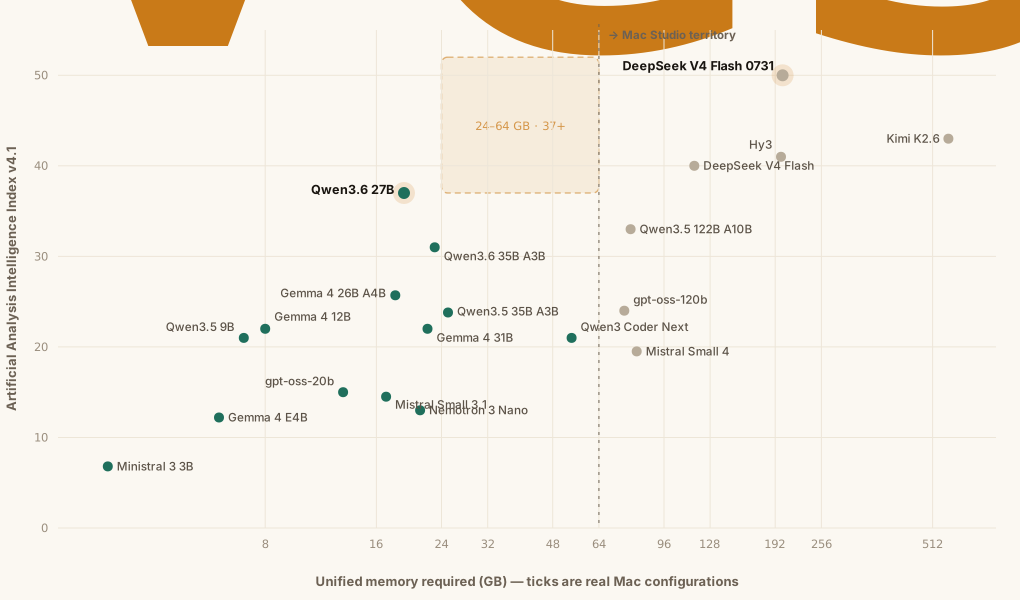
The horizontal axis is the thing that actually constrains you. It plots each model's own footprint, weights plus 20%; the tables below also leave 3 GB for macOS, so a point just left of a tick can land a tier higher. The vertical axis is the Artificial Analysis Intelligence Index v4.1 — a composite of reasoning, coding and agentic benchmarks.
Three things fall out of it.
A 24 GB Mac gets you to 37. That is Qwen3.6 27B, and it is the ceiling for the machine most people own. It is also a genuinely useful model — tool calling, long context, agentic workloads. The engine's 24 GB pick, bonsai-27b-2bit, is a 2-bit build of it; the 37 is the full-precision model's score, not the 2-bit build's.
The 50-point model needs a $10,000 machine. DeepSeek V4 Flash 0731 is the most capable open-weights model we serve. Its smallest quantization is 167 GB of weights, so it wants a 256 GB Mac Studio. Kimi K2.6 asks for 471 GB — more than any Mac ships with.
Between them is a hole. Nothing sits in the 24–64 GB band above 37 points. Not because we skipped it: no released open-weights model belongs there. Everything scoring above 37 on that index has 300 B+ parameters, and 300 B parameters do not fit in 64 GB at any quantization anyone ships today.
That gap is the whole game for local inference. A 40-point model that fits in 48 GB would be worth more to Mac users than another 500 B model that only a maxed Studio can load. It is a compression problem, not a catalog problem — which is why deepseek-v4-flash-2bit (2-bit, 96 GB, down from 151 GB at 4-bit) and bonsai-27b-2bit (a 27 B model in 8.5 GB) matter more than they look.
The one number to memorise
If you do not want to look anything up, this gets you close for a 4-bit model:
weights (GB)  ≈  parameters (B) × 0.6
usable RAM    ≈  total RAM − 3 GB for macOS − your KV cache
That 0.6 is not a guess — it is the median across the 58 four-bit checkpoints in our registry that name their parameter count. Half land between 0.57 and 0.70.
Two places it breaks. Big MoE models come in leaner — gpt-oss-120b and Qwen3.5 122B both sit near 0.52, because much of the parameter count is in experts that quantize well. Small models come in fatter — Gemma 3n E2B is 2.25 GB per billion, since embeddings and the vocabulary do not shrink with the transformer body and they dominate a 2 B model. Below about 4 B, ignore the formula and read the number.
Leave room for the context
The formula above sizes the weights. The KV cache is on top, it grows with context length, and it is the thing that turns "it loaded fine" into a swap death spiral three turns into a long conversation.
Rapid-MLX quantizes the live KV cache to int4 by default, which is most of why these numbers work at all — but a 128k-token context still costs real memory. If a model only just fits, it does not fit.
Why the cost axis lies to you
Artificial Analysis plots intelligence against cost per task, which is the right axis for an API buyer and the wrong one for you. Two reasons.
Run the model locally and the marginal cost is electricity. The x-axis collapses.
Worse, it inverts. Mixture-of-experts models look cheap per task because each token only activates a slice of the network — but you still have to hold every parameter in memory. MiMo-V2.5 is the cheapest 37-point model on the AA chart at $0.011 per task. It is also 311 B parameters. On a Mac it is one of the least runnable models on the entire chart.
So a model being cheap in the cloud tells you nothing about whether your laptop can load it, and sometimes tells you the opposite.
What fits, by machine
Sizes are the download for the smallest usable quantization. Budget roughly 20% on top for the KV cache and activations — more if you run long contexts — and 3 GB for macOS. Each model is listed under the smallest Mac where download × 1.2 + 3 GB fits; Kimi K2.6 fits none and is listed at 512 GB.
The fit tables below list checkpoint sizes and estimated memory tiers, including models the engine does not pick by default. For example, qwen3.5-4b-4bit fits in the 8 GB estimate, while the v0.16.0 engine first recommends it at 16 GB; bonsai-27b-2bit appears in the 16 GB estimate, while the engine first recommends it at 24 GB.
8 GB — the base MacBook Air
Every one of these fits on the cheapest Apple Silicon Mac sold today.
23 models fit.
| alias | download | model |
|---|---|---|
granite4-tiny-4bit |
3.9 GB | mlx-community/granite-4.0-h-tiny-4bit |
gemma-4-e2b-4bit |
3.6 GB | mlx-community/gemma-4-e2b-it-4bit |
vibethinker-3b-8bit |
3.3 GB | mlx-community/VibeThinker-3B-8bit |
qwen3.5-4b-4bit |
3.1 GB | mlx-community/Qwen3.5-4B-MLX-4bit |
gemma3-4b-qat-4bit |
3.0 GB | mlx-community/gemma-3-4b-it-qat-4bit |
ministral-3b-4bit |
2.8 GB | mlx-community/Ministral-3-3B-Instruct-2512-4bit |
qwen3-4b-thinking-2507-4bit |
2.3 GB | mlx-community/Qwen3-4B-Thinking-2507-4bit |
qwen3-4b-instruct-2507-4bit |
2.3 GB | mlx-community/Qwen3-4B-Instruct-2507-4bit |
phi-4-mini-4bit |
2.2 GB | mlx-community/phi-4-mini-instruct-4bit |
nanbeige4.1-3b-4bit |
2.2 GB | mlx-community/Nanbeige4.1-3B-4bit |
phi-4-mini-reasoning-4bit |
2.2 GB | lmstudio-community/Phi-4-mini-reasoning-MLX-4bit |
phi-3.5-mini-4bit |
2.2 GB | mlx-community/Phi-3.5-mini-instruct-4bit |
llama3-3b-4bit |
1.8 GB | mlx-community/Llama-3.2-3B-Instruct-4bit |
granite4-h-micro-4bit |
1.8 GB | mlx-community/granite-4.0-h-micro-4bit |
smollm3-3b-4bit |
1.7 GB | mlx-community/SmolLM3-3B-4bit |
qwen3-1.7b-4bit |
1.0 GB | mlx-community/Qwen3-1.7B-4bit |
vibethinker-1.5b-4bit |
0.9 GB | mlx-community/VibeThinker-1.5B-mlx-4bit |
gemma3-1b-qat-4bit |
0.8 GB | mlx-community/gemma-3-1b-it-qat-4bit |
llama3-1b-4bit |
0.7 GB | mlx-community/Llama-3.2-1B-Instruct-4bit |
lfm2.5-1b-4bit |
0.7 GB | mlx-community/LFM2.5-1.2B-Instruct-4bit |
minicpm5-1b-4bit |
0.6 GB | openbmb/MiniCPM5-1B-MLX |
bonsai-1.7b-2bit |
0.5 GB | prism-ml/Ternary-Bonsai-1.7B-mlx-2bit |
qwen3-0.6b |
0.4 GB | mlx-community/Qwen3-0.6B-4bit |
16 GB
21 models fit.
| alias | download | model |
|---|---|---|
deepseek-coder-v2-lite-16b-4bit |
8.8 GB | mlx-community/DeepSeek-Coder-V2-Lite-Instruct-4bit-mlx |
bonsai-27b-2bit |
8.5 GB | prism-ml/Ternary-Bonsai-27B-mlx-2bit |
qwen2.5-14b-4bit |
8.3 GB | mlx-community/Qwen2.5-14B-Instruct-4bit |
phi-4-14b-4bit |
8.3 GB | mlx-community/phi-4-4bit |
gemma3-12b-4bit |
8.1 GB | mlx-community/gemma-3-12b-it-qat-4bit |
gemma-4-12b-4bit |
6.8 GB | mlx-community/gemma-4-12B-it-4bit |
qwen3.5-9b-4bit |
6.0 GB | mlx-community/Qwen3.5-9B-4bit |
gemma-3n-e4b-4bit |
5.9 GB | lmstudio-community/gemma-3n-E4B-it-MLX-4bit |
ui-tars-7b-dpo-4bit |
5.7 GB | mlx-community/UI-TARS-7B-DPO-4bit |
ui-tars-7b-sft-4bit |
5.7 GB | mlx-community/UI-TARS-7B-SFT-4bit |
gemma-4-e4b-4bit |
5.2 GB | mlx-community/gemma-4-e4b-it-4bit |
tmax-9b |
5.1 GB | mlx-community/Tmax-9B-MLX-4bit |
qwopus-9b-4bit |
5.1 GB | Jackrong/MLX-Qwopus3.5-9B-v3-4bit |
ui-tars-1.5-7b-4bit |
4.9 GB | mlx-community/UI-TARS-1.5-7B-4bit |
lfm2.5-8b-a1b-4bit |
4.8 GB | mlx-community/LFM2.5-8B-A1B-MLX-4bit |
qwen3-8b-4bit |
4.6 GB | mlx-community/Qwen3-8B-4bit |
deepseek-r1-8b-4bit |
4.6 GB | mlx-community/DeepSeek-R1-0528-Qwen3-8B-4bit |
llama-3.1-8b-4bit |
4.5 GB | mlx-community/Meta-Llama-3.1-8B-Instruct-4bit |
hermes3-8b-4bit |
4.5 GB | mlx-community/Hermes-3-Llama-3.1-8B-4bit |
gemma-3n-e2b-4bit |
4.5 GB | mlx-community/gemma-3n-E2B-it-4bit |
qwen3-4b-8bit |
4.3 GB | mlx-community/Qwen3-4B-8bit |
24 GB
The sweet spot: this is where the strongest small-machine models live.
16 models fit.
| alias | download | model |
|---|---|---|
qwen3-coder-30b-4bit |
17.2 GB | mlx-community/Qwen3-Coder-30B-A3B-Instruct-4bit |
glm4.7-9b-4bit |
16.9 GB | mlx-community/GLM-4.7-Flash-4bit |
gemma3-27b-qat-4bit |
16.9 GB | mlx-community/gemma-3-27b-it-qat-4bit |
diffusion-gemma-26b-4bit |
16.6 GB | mlx-community/diffusiongemma-26B-A4B-it-4bit |
qwen3.5-27b-4bit |
16.1 GB | mlx-community/Qwen3.5-27B-4bit |
qwen3.6-27b |
16.1 GB | mlx-community/Qwen3.6-27B-4bit |
gemma-4-26b-qat-4bit |
15.6 GB | mlx-community/gemma-4-26B-A4B-it-qat-4bit |
gemma-4-26b-4bit |
15.4 GB | mlx-community/gemma-4-26b-a4b-it-4bit |
tmax-27b |
15.2 GB | mlx-community/Tmax-27B-MLX-4bit |
qwopus-27b-4bit |
15.2 GB | Jackrong/MLX-Qwopus3.5-27B-v3-4bit |
devstral-v2-24b-4bit |
15.1 GB | mlx-community/Devstral-Small-2-24B-Instruct-2512-4bit |
mistral-24b-4bit |
14.1 GB | mlx-community/Mistral-Small-3.1-24B-Instruct-2503-4bit |
lfm2-24b-a2b-4bit |
13.4 GB | lmstudio-community/LFM2-24B-A2B-MLX-4bit |
devstral-24b-4bit |
13.3 GB | mlx-community/Devstral-Small-2507-4bit |
gpt-oss-20b-mxfp4-q4 |
11.2 GB | mlx-community/gpt-oss-20b-MXFP4-Q4 |
gpt-oss-safeguard-20b |
11.2 GB | lmstudio-community/gpt-oss-safeguard-20b-MLX-MXFP4 |
32 GB
6 models fit.
| alias | download | model |
|---|---|---|
holo3.1-35b-a3b |
23.5 GB | pipenetwork/Holo-3.1-35B-A3B-MLX-4bit |
qwen3.5-35b-4bit |
20.4 GB | mlx-community/Qwen3.5-35B-A3B-4bit |
qwen3.6-35b-mxfp4 |
19.3 GB | mlx-community/Qwen3.6-35B-A3B-mxfp4 |
gemma-4-31b-4bit |
18.4 GB | mlx-community/gemma-4-31b-it-4bit |
deepseek-r1-32b-4bit |
18.4 GB | mlx-community/DeepSeek-R1-Distill-Qwen-32B-4bit |
nemotron-30b-4bit |
17.8 GB | lmstudio-community/NVIDIA-Nemotron-3-Nano-30B-A3B-MLX-4bit |
48 GB
1 model fits.
| alias | download | model |
|---|---|---|
gemma-4-31b-qat-4bit |
28.8 GB | mlx-community/gemma-4-31B-it-qat-4bit |
64 GB
Past here you are buying a Mac Studio, not a laptop.
3 models fit.
| alias | download | model |
|---|---|---|
qwen3-coder-next-80b-4bit |
44.9 GB | mlx-community/Qwen3-Coder-Next-4bit |
ui-tars-72b-dpo-4bit |
42.3 GB | mlx-community/UI-TARS-72B-DPO-4bit |
hermes4-70b-4bit |
39.7 GB | lmstudio-community/Hermes-4-70B-MLX-4bit |
96 GB
4 models fit.
| alias | download | model |
|---|---|---|
mistral-small-4-119b-4bit |
67.8 GB | mlx-community/Mistral-Small-4-119B-2603-4bit |
qwen3.5-122b-mxfp4 |
64.9 GB | nightmedia/Qwen3.5-122B-A10B-Text-mxfp4-mlx |
gpt-oss-120b-mxfp4-q4 |
62.4 GB | mlx-community/gpt-oss-120b-MXFP4-Q4 |
glm4.5-air-4bit |
60.2 GB | mlx-community/GLM-4.5-Air-4bit |
128 GB
2 models fit.
| alias | download | model |
|---|---|---|
qwen3.5-122b-6bit |
100.1 GB | mlx-community/Qwen3.5-122B-A10B-6bit |
deepseek-v4-flash-2bit |
96.5 GB | mlx-community/DeepSeek-V4-Flash-2bit-DQ |
192 GB
2 models fit.
| alias | download | model |
|---|---|---|
minimax-m2.5-4bit |
128.7 GB | lmstudio-community/MiniMax-M2.5-MLX-4bit |
minimax-m2.7-mxfp4 |
121.5 GB | mlx-community/MiniMax-M2.7-4bit-mxfp4 |
256 GB
2 models fit.
| alias | download | model |
|---|---|---|
deepseek-v4-flash-0731-mxfp4 |
167.1 GB | Vontra/DeepSeek-V4-Flash-0731-MXFP4-MLX |
hy3-preview-4bit |
166.0 GB | mlx-community/Hy3-preview-4bit |
512 GB — maxed M3 Ultra
Kimi K2.6 asks for more than any Mac ships with — listed for completeness.
1 model fits, and Kimi K2.6 is listed with it.
| alias | download | model |
|---|---|---|
kimi-k2.6 |
470.6 GB | mlx-community/Kimi-K2.6-mlx-DQ3_K_M-q8 |
glm-5.2-reap50 |
214.4 GB | pipenetwork/GLM-5.2-REAP50-MLX-4bit |
Picking one
The tables above are what fits. What to run is the engine's call: rapid-mlx recipe reads your Mac's memory and prints its pick, and the installer and the desktop app show the same one. Peak memory and speed below are measured on real Macs; Best local LLM for your Mac, by RAM has every run behind them.
- 8 GB —
lfm2.5-2.6b-4bit: 2.7 GB peak and 93.2 tok/s on a 32 GB M2 Pro. A tool-caller and chat model, not a coding model. - 16 GB —
qwen3.5-4b-4bit: 4.3 GB peak and 45.4 tok/s on an 18 GB M3 Pro. - 18 GB —
qwen3.5-9b-4bit: 6.7 GB peak and 26.3 tok/s on an 18 GB M3 Pro. - 24 GB —
bonsai-27b-2bit, the 2-bit build of Qwen3.6 27B: 11.0 GB peak and 19.3 tok/s on a 32 GB M2 Pro; a 13.5 GB Metal peak and 22.4 tok/s on our 48 GB M4 Pro. - 32 GB and up —
qwen3.8-27b-4bit: 18.7 GB peak and 15.4 tok/s on a 24 GB M4 Pro; 18.6 GB peak and 32.9 tok/s on a 64 GB M5 Max. It is newer than the tables above, so it is not in them. From 48 GB the fast pick becomesqwen3.6-35b-4bit, a 35B mixture-of-experts at 85.4–104 tok/s on a 48 GB M4 Pro.
The engine's most capable pick stays qwen3.8-27b-4bit all the way up. The bigger models in the tables are there when you choose them yourself: qwen3-coder-next-80b-4bit for coding at 64 GB, qwen3.5-122b-mxfp4 at 96 GB, deepseek-v4-flash-2bit at 128 GB, and deepseek-v4-flash-0731-mxfp4, the 50-point model, at 256 GB.
To see what your own machine can hold, without reading a table:
pip install rapid-mlx
rapid-mlx recipe          # the engine's pick for this Mac
rapid-mlx models          # every alias, with download size
rapid-mlx doctor          # what this Mac can actually run
Or use the live picker — choose your Mac, see what fits.
What these numbers are, and are not
We would rather over-explain this than have someone quote it wrongly.
The intelligence scores are borrowed, and they are not measured on what you will run. Artificial Analysis evaluates full-precision models served over an API. rapid-mlx runs 2/4/6/8-bit MLX quantizations. Quantization costs accuracy. We have not run the AA task set against our own quantized builds, so read every vertical position as "this model family's tier" — not "this alias scores that." Closing that gap is on our list, and it matters: if 2-bit quantization drops a 40-point model to 30, the whole "compress it into 64 GB" strategy needs rethinking.
The memory figures are ours and they are real, but they are still estimates. Weight sizes come from the actual checkpoints. The 20% headroom, the 3 GB for macOS and the rounding up to Mac configurations are engineering judgement, not measurement. A long context, a second loaded model, or anything else on the machine will push you into the next tier.
Only 20 of the 82 models have an AA score at all. The rest — UI-TARS, Tmax, VibeThinker, Holo3, Devstral, LFM2, the Bonsai ternary builds — have never been benchmarked by Artificial Analysis, so they appear in the tables and not the chart. Absence from the plot says nothing about them.
Scores are AA Intelligence Index v4.1, read on 2026-07-31. Both the index and the model set move. rapid-mlx serves 166 text aliases; this page covers the 82 distinct models behind them.
Frequently asked questions
How much RAM do I need to run a local LLM on a Mac?
8 GB is enough to run real models — 23 of the 82 here fit, and the engine's pick there is lfm2.5-2.6b-4bit. 16 GB is comfortable. 24 GB is the sweet spot: the engine picks bonsai-27b-2bit, a 2-bit build of Qwen3.6 27B, the highest-scoring model on the chart above that fits a machine most people own. Above 64 GB you are buying a Mac Studio.
Can a 16 GB MacBook Air run a local LLM?
Yes. The engine's pick for 16 GB is qwen3.5-4b-4bit, which peaks at 4.3–5.3 GB. Bigger models fit too — Qwen3.5 9B peaked at 7.8 GB on a 16 GB M4 — but leave room for macOS and the KV cache; if a model only just fits, it does not fit.
Does a Mixture-of-Experts model use less memory?
No — only less compute. MoE activates a slice of the network per token, which makes it fast and cheap to serve, but every parameter still has to be resident. This is why MiMo-V2.5 looks like the cheapest capable model on cost-per-task charts and is simultaneously one of the least runnable on a Mac: 311 B parameters have to fit somewhere.
How do I estimate the memory a model needs?
Multiply parameters in billions by 0.6 for a 4-bit build, then subtract about 3 GB from your total RAM for macOS and leave headroom for the KV cache. The 0.6 is the median across 58 four-bit checkpoints in our registry. It breaks below ~4 B, where embeddings dominate and models come in fatter.
What is the most capable model that runs locally on a Mac?
DeepSeek V4 Flash 0731, at 50 on the Artificial Analysis Intelligence Index — but its smallest quantization is 167 GB of weights, so it needs a 256 GB Mac Studio. For a laptop, Qwen3.6 27B at 24 GB is the highest-scoring model on the chart that fits.
Questions about Mac memory for local LLMs
How much memory do I need for a local LLM on a Mac?
The engine has an 8 GB tier for chat and tools. On that Mac, run rapid-mlx serve lfm2.5-2.6b-4bit; 16 GB moves the default to qwen3.5-4b-4bit.
Can a 16 GB MacBook Air run a local LLM?
Yes. The 16 GB recommendation is qwen3.5-4b-4bit, with a 6 GB policy working-set footprint; run rapid-mlx serve qwen3.5-4b-4bit.
What local LLM fits a 24 GB Mac?
The engine's 24 GB default is bonsai-27b-2bit, with a 13 GB policy working-set footprint. Run rapid-mlx serve bonsai-27b-2bit; it is a text-only model.
How much memory does the 32 GB pick need?
qwen3.8-27b-4bit has a 20 GB policy working-set footprint and first appears in the 32 GB recommendation tier. Run rapid-mlx serve qwen3.8-27b-4bit; a 36 GB Mac uses that same tier.
Should I choose a bigger model on a 96 or 128 GB Mac?
The general-purpose default remains qwen3.8-27b-4bit at both memory sizes. Run rapid-mlx serve qwen3.8-27b-4bit, or compare other aliases in the model catalog if you have a specific task.
Related
- Best local LLM for your Mac, by RAM — the engine's pick for each Mac, measured
- Every alias, quant and family — the full reference
- RAM tier map + serve flags per tier
- Rapid-MLX vs Ollama vs LM Studio — an honest comparison with a reproducible benchmark
rapid-mlx serve <alias> serves any model on
localhost:8000/v1.
curl -fsSL https://rapidmlx.com/install.sh | bash
New models and speedups, in your inbox
A short note whenever Rapid-MLX gets faster or adds models worth running on your Mac. No spam — unsubscribe anytime.