Best Local LLM for Mac: 8 GB to 128 GB RAM
One answer for each Mac, not a survey of what exists: the engine's pick for your memory, and what it measured on real Macs. The August 2026 table this post started with is further down, with what changed.
The best local LLM for your Mac depends first on its unified memory. Choose the row for your Mac's memory, then run the command in that row.
Quick answer: best local LLM by Mac RAM
These are the engine's general-purpose picks. A 36 GB Mac uses the 32 GB tier, and a 128 GB Mac uses the 96 GB tier. The engine has a separate fast pick at some tiers.
| Unified memory | Recommended alias | Command | Good for |
|---|---|---|---|
| 8 GB | lfm2.5-2.6b-4bit |
rapid-mlx serve lfm2.5-2.6b-4bit |
Chat and tools; avoid coding |
| 16 GB | qwen3.5-4b-4bit |
rapid-mlx serve qwen3.5-4b-4bit |
Everyday chat and code |
| 24 GB | bonsai-27b-2bit |
rapid-mlx serve bonsai-27b-2bit |
Larger text-only tasks |
| 32/36 GB | qwen3.8-27b-4bit |
rapid-mlx serve qwen3.8-27b-4bit |
General work and code |
| 48 GB | qwen3.8-27b-4bit |
rapid-mlx serve qwen3.8-27b-4bit |
General work with headroom |
| 64 GB | qwen3.8-27b-4bit |
rapid-mlx serve qwen3.8-27b-4bit |
General work with headroom |
| 96/128+ GB | qwen3.8-27b-4bit |
rapid-mlx serve qwen3.8-27b-4bit |
General work with more headroom |
For a Pro-focused comparison, read best local AI models for a MacBook Pro. For working-set memory and other constraints, read how much memory a local LLM needs, or browse the model catalog.
"Which model should I run?" has one useful answer, and it is not a list. It is the amount of unified memory in your Mac.
We already published the survey version of this — 82 models plotted against the memory they need. This is the other half: for each Mac, one model, and the evidence behind the choice.
There is a reason we wrote it down. Until early August 2026 rapid-mlx answered this question two different ways. The curl | bash installer printed one recommendation; the desktop app's picker showed another. At five of six tiers they disagreed. So we picked the table that was actually being maintained, measured every model in it in a single run, and made both front doors read from it.
The picks today
rapid-mlx recipe reads your Mac's memory and prints the engine's two picks for it, the most capable that fits and the fastest, with the command to run each; the installer and the desktop app show the same picks. Below is each tier's most capable pick (the 48 GB tier shows its fast pick) with peak memory and decode speed measured on real Macs, from the community leaderboard or our own runs. Each line names the Mac and the rapid-mlx version. The picks themselves are the engine's recommendation policy, not a ranking of these numbers.
8 GB
Run it with rapid-mlx serve lfm2.5-2.6b-4bit, the most capable pick that fits. The fast pick is lfm2.5-1b-4bit.
- M2 Pro, 32 GB: 93.2 tok/s · rapid-mlx 0.14.2, 2.7 GB peak
A tool-caller and chat model, not a coding model (more on why below).
16 GB
Run it with rapid-mlx serve qwen3.5-4b-4bit, the most capable pick that fits. The fast pick is lfm2.5-1b-4bit.
- M1 Pro, 32 GB: 54.7 tok/s · rapid-mlx 0.15.4, 5.3 GB peak
- M2 Pro, 32 GB: 62.4 tok/s · rapid-mlx 0.14.2, 4.4 GB peak
- M3 Pro, 18 GB: 45.4 tok/s · rapid-mlx 0.13.4, 4.3 GB peak
18 GB
Run it with rapid-mlx serve qwen3.5-9b-4bit, the most capable pick that fits. The fast pick is qwen3.5-4b-4bit.
- M4, 16 GB: 20.6 tok/s · rapid-mlx 0.14.3, 7.8 GB peak
- M3 Pro, 18 GB: 26.3 tok/s · rapid-mlx 0.13.4, 6.7 GB peak
- M2 Pro, 32 GB: 36.0 tok/s · rapid-mlx 0.14.2, 6.8 GB peak
24 GB
Run it with rapid-mlx serve bonsai-27b-2bit, the most capable pick that fits. The fast pick is qwen3.5-4b-4bit.
- M2 Pro, 32 GB: 19.3 tok/s · rapid-mlx 0.14.2, 11.0 GB peak
- M4 Pro, 48 GB: 22.4 tok/s · rapid-mlx 0.15.5, our run, 13.5 GB Metal peak
32 GB and up
Run it with rapid-mlx serve qwen3.8-27b-4bit, the most capable pick that fits. At 32 through 47 GB, the fast pick is qwen3.5-4b-4bit; from 48 GB it changes to qwen3.6-35b-4bit.
- M4 Pro, 24 GB: 15.4 tok/s · rapid-mlx 0.13.4, 18.7 GB peak
- M2 Pro, 32 GB: 9.9 tok/s · rapid-mlx 0.14.3, 18.6 GB peak
- M5 Max, 64 GB: 32.9 tok/s · rapid-mlx 0.14.3, 18.6 GB peak
48 GB and up, for speed
From 48 GB the most capable pick stays qwen3.8-27b-4bit, and the fast pick becomes a 35B mixture-of-experts.
Run it with rapid-mlx serve qwen3.6-35b-4bit.
- M4 Pro, 48 GB: 85.4 tok/s · rapid-mlx 0.14.1, 20.2 GB peak
- M4 Pro, 48 GB: 104 tok/s · rapid-mlx 0.15.4, our run, 23.2 GB Metal peak
For every model measured on your exact chip and memory, see Best local LLMs by Mac: one page each for the M4 Pro 48 GB, M2 Pro 32 GB, M1 Pro 32 GB and M1 Max 64 GB.
Other models that fit specific jobs
The table above remains the engine's general-purpose picks. If you need image input on an 8–16 GB Mac, Ternary Bonsai 2 offers three 2-bit Hadamard options. All accept images, tool calls and reasoning:
| Mac memory | Option | Download | Command |
|---|---|---|---|
| 8 GB+ | Bonsai 2 2B | 1.2 GB | rapid-mlx serve bonsai2-2b-2bit |
| 8 GB+ | Bonsai 2 4B | 1.95 GB | rapid-mlx serve bonsai2-4b-2bit |
| 16 GB+ | Bonsai 2 9B | 3.6 GB | rapid-mlx serve bonsai2-9b-2bit |
For text chat, reasoning and tool calls on larger Macs, Nemotron 3.5 has these options:
| Mac memory | Option | Download | Command |
|---|---|---|---|
| 48 GB+ | Bolt 74B-A9B, 3-bit | 31.7 GB | rapid-mlx serve nemotron-3.5-bolt-3bit |
| 64 GB+ | Bolt 74B-A9B, 4-bit | 43.3 GB | rapid-mlx serve nemotron-3.5-bolt |
| 64 GB, short context | Super VL 120B-A12B, mixed 3-bit | 42.8 GB | rapid-mlx serve nemotron-3.5-super-vl-3bit |
| 128 GB+ | Super VL 120B-A12B, 4-bit | 69.5 GB | rapid-mlx serve nemotron-3.5-super-vl |
Rapid-MLX serves these Nemotron models as text only: image and video input are unavailable. Download size is not runtime memory use; leave room for macOS, context and other apps. The Super VL 3-bit build targets 64 GB Macs at short context.
The August 2026 table
This post first published a different table. The engine's picks have changed since, so read this section as the record of that decision, not as advice.
Peak RSS was the whole rapid-mlx serve process tree; boot was a cold start to a 200 on /v1/models. All six were measured in one run on one M3 Ultra.
- 8–15 GB:
lfm2.5-2.6b-4bit, 2.0 GB peak RSS, 4.8 s boot - 16–23 GB:
bonsai-27b-2bit, 8.4 GB peak RSS, 4.8 s boot - 24–31 GB:
gemma-4-26b-4bit, 15.6 GB peak RSS, 4.8 s boot - 32–63 GB:
qwen3.6-35b-4bit, 20.4 GB peak RSS, 4.8 s boot - 64–95 GB:
qwen3.6-35b-8bit, 37.7 GB peak RSS, 10.6 s boot - 96 GB+:
qwen3.5-122b-mxfp4, not measured
What changed. The engine's policy now places bonsai-27b-2bit in its 24 GB tier, not at 16 GB, and picks qwen3.8-27b-4bit from 32 GB up. Separately, later measurements of Bonsai-27B read higher than the 8.4 GB peak RSS above: a community run on an M2 Pro reported an 11.0 GB peak, and our M4 Pro run showed a 7.7 GB peak RSS alongside a 13.5 GB Metal peak. Which counter you read changes the answer. The picks at the top of this post are the current ones.
Why the August picks were chosen
8–15 GB — the tier that had nothing
This one changed most, because until this week it had no answer at all. The app clamped these Macs up to the 16 GB picks, then correctly refused to run them. The first thing a new user saw was the app declining to start the only model it had offered.
LFM2.5-2.6B fixed that, and the reason is architectural rather than a matter of parameter count. Of its 30 layers, 22 are short convolutions and only 8 are attention. KV cache costs roughly 16 KB per token, so a 32K conversation adds about half a gigabyte on top of 1.6 GB of weights. On an M2 Pro it decodes at 97.8 tok/s and prefills at 503 tok/s.
It is post-trained for tool use and instruction following and beats models several times its size on those. It is not a coding model — Liquid publishes it as not recommended for agentic coding or knowledge-heavy work, and we agree. If you want to drive Claude Code or Aider, 16 GB is where that starts working.
16–23 GB — a 27B on a MacBook Air
bonsai-27b-2bit is Ternary Bonsai 27B, a low-bit build of Qwen3.6-27B at 1.71 bits per weight. A 27B-class model at 8.4 GB is why this tier gets something far more capable than its memory would normally buy.
The trade is speed: 17.8 tok/s on an M2 Pro, against 121 tok/s for the much smaller lfm2.5-8b-a1b-4bit that the desktop app offered alongside it as a faster alternative. Quality per gigabyte, not tokens per second.
24–31 GB — flags that are not optional
rapid-mlx serve gemma-4-26b-4bit --no-mllm --kv-cache-dtype bf16 --cache-memory-mb 512
Gemma 4 26B ships a vision tower this tier has no memory for, and an unbounded KV budget will claim the headroom a 24 GB Mac needs for everything else running on it. --no-mllm drops the vision path; the other two cap the cache. With them it peaks at 15.6 GB. Without them you are handing a 24 GB Mac a command that does not fit in it.
The installer printed the full line in August. Picking the same model by hand on a larger Mac kept vision — the flags traveled with that tier recommendation, not with the model. The engine now picks bonsai-27b-2bit at 24 GB.
32–63 GB and 64–95 GB — the same model, twice
qwen3.6-35b-4bit and qwen3.6-35b-8bit are the same 35B-A3B weights at two quantizations. 35B total, 3B active per token, so it is fast for its class.
At 32 GB the 4-bit build peaks at 20.4 GB, leaving room for a browser and an IDE — the real constraint on a machine you also work on. At 64 GB the 8-bit build fits at 37.7 GB, and its edge is quantization fidelity on long and hard prompts rather than benchmark points. Note the boot time: 10.6 s against 4.8 s, the only tier where startup is noticeable.
96 GB+ — the honest blank
qwen3.5-122b-mxfp4 was the August pick, and its two cells are empty because we have not measured it on the same machine as the rest. Pulling 65 GB onto the shared Studio that also runs our release gate was not worth the disk that day. We would rather show a blank than a number that is not comparable to the five above it.
Fast is the easy half
This section compares the August picks. Memory and throughput are the easy things to measure and the wrong things to optimise alone. A model that fits and runs at 100 tok/s is worthless if it cannot follow an instruction or finish a tool call.
Comparing these six on capability is awkward, because they are quantized differently — 2-bit, 4-bit, 8-bit, MXFP4 — and scores from one quantization do not transfer to another. So the common yardstick is the full-precision base model behind each pick, scored by someone who is not us.
The Artificial Analysis Intelligence Index v4.1 is a composite of nine evaluations, and usefully it is not a knowledge quiz: Terminal-Bench v2.1 and τ³-Banking cover agentic tool use, GDPval-AA v2 covers real-world work tasks, SciCode covers coding, GPQA Diamond and CritPt cover reasoning, AA-LCR covers long context. Higher is better. For calibration: the median for comparable open-weights models is 9, and the whole index tops out at 61 — the best frontier model money can rent, running in someone else's datacentre. Everything below runs on your desk with the network off.
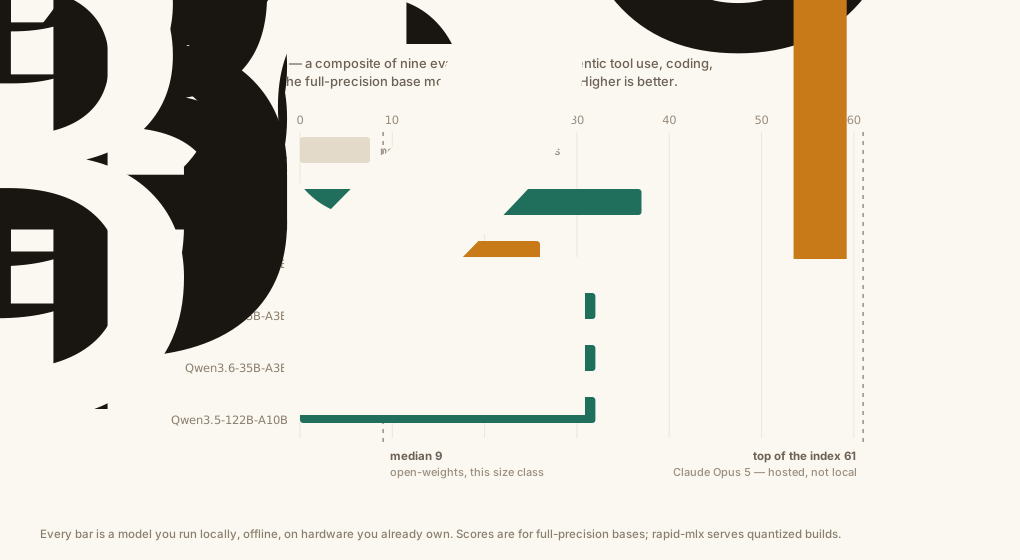
| Tier | Pick | Full-precision base | AA Intelligence Index v4.1 |
|---|---|---|---|
| 8–15 GB | lfm2.5-2.6b-4bit |
LFM2.5-2.6B | not scored |
| 16–23 GB | bonsai-27b-2bit |
Qwen3.6-27B | 37 |
| 24–31 GB | gemma-4-26b-4bit |
Gemma 4 26B A4B | 26 |
| 32–63 GB | qwen3.6-35b-4bit |
Qwen3.6-35B-A3B | 32 |
| 64–95 GB | qwen3.6-35b-8bit |
Qwen3.6-35B-A3B | 32 |
| 96 GB+ | qwen3.5-122b-mxfp4 |
Qwen3.5-122B-A10B | 32 |
That column does not climb, and we are not hiding it
The base behind the August 16 GB pick scores 37 — the highest in the table — and the August 24 GB tier scored 26.
Two things are true at once. Qwen3.6-27B is dense and genuinely the strongest base here; Artificial Analysis has it at 37 against 32 for the 35B-A3B MoE, matching what Qwen's own benchmarks show. It is also the slowest, at 59 tok/s against 152 for the MoE on AA's hosted measurements — and our August 16 GB pick was a 2-bit compression of Qwen3.6-27B running at 17.8 tok/s on an M2 Pro.
So the August 24 GB tier bought speed and a vision tower, not raw intelligence. Whether that is the right trade is a fair question, and our own blended capability score — which rates the two nearly level — disagrees with Artificial Analysis here. We are not reordering six tiers on the strength of one composite index. We are going to measure the actual builds and let that decide.
"But two of these are aggressively quantized"
A 27B squeezed to 2 bits and a 122B to MXFP4 are not the models whose scores you just read. That objection is right, and for the August 16 GB pick there is a direct answer, because prism-ml benchmarked the low-bit build itself.
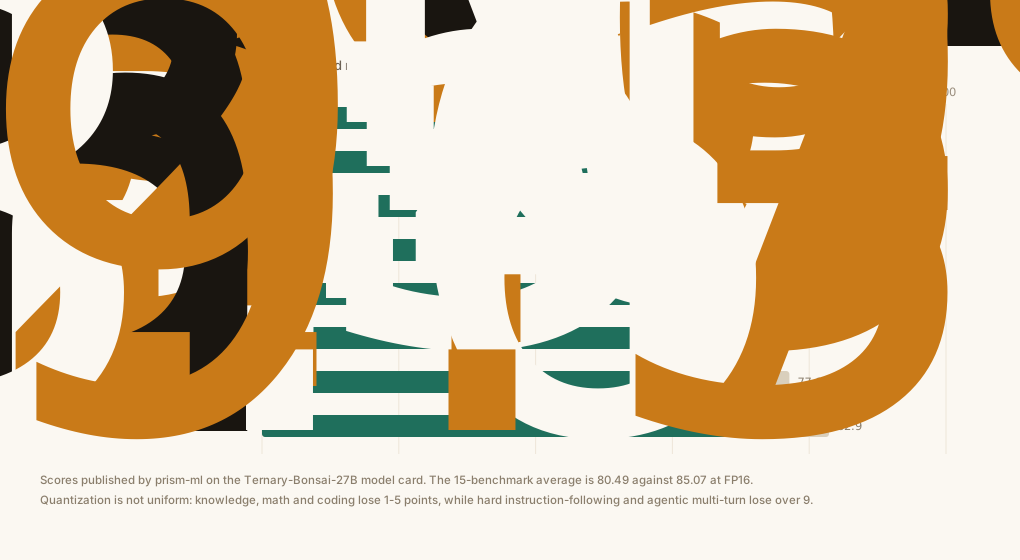
80.49 against 85.07 across fifteen benchmarks — 94.6% retained at 1.71 bits per weight. That is why, in August, we were comfortable putting a 2-bit model in front of a 16 GB Mac.
The loss is not uniform, which is the useful part. Knowledge, math and straightforward coding barely move: MMLU-Redux 88.05, AIME25 90.84, HumanEval+ 93.90. What degrades is the hard end of instruction-following (IFBench 58.50 against 68.03) and multi-turn agentic work (τ²-Bench 73.61 against 82.90). For chat and code completion a 2-bit 27B is a bargain. For long agent loops, that is where the missing bits show up.
What the 8 GB pick has instead
LFM2.5-2.6B is not on Artificial Analysis, so its row reads blank rather than guessed. Liquid publishes its own numbers, and on the axes this tier is for — tools and instruction-following — it beats a model roughly four times its size:
| LFM2.5-2.6B | Qwen3.5-9B | |
|---|---|---|
| ToolSandbox | 77.83 | 76.44 |
| Multi-IF | 80.07 | 62.55 |
| IFStruct | 85.49 | 78.50 |
| BFCLv4 | 56.88 | 60.13 |
| AA-Omniscience (knowledge) | −29.50 | −50.43 |
A negative Omniscience score means a model asserts more than it knows. Every model in that comparison is negative; LFM2.5-2.6B is the least bad. It is a tool-caller, not an encyclopedia — which is the job an 8 GB Mac actually has.
About these numbers
Three things worth knowing before you compare them to anyone else's.
Weights on disk are not what a model costs you. Our own tier table listed bonsai-27b-2bit at 7.6 GB, which is the size of its weight tensors. Served, it peaked at 8.4 GB of RSS; later runs reported 11.0 GB (a community run on an M2 Pro) and a 13.5 GB Metal peak (ours, on an M4 Pro). Weights are the floor, never the number — on top sit the runtime, the tokenizer, and a KV cache that grows with the conversation.
How you measure moves the answer by two gigabytes. We produced two peak numbers for the same model that differed by 2.3 GB, and the first explanation we reached for — longer prompts cost more memory — was wrong. Through rapid-mlx serve, a short prompt peaks at 8.4 GB and a 2,000-token prompt at 8.5 GB on the same machine. The 10.7 GB came from a bare mlx_lm script: a different metric, and no KV quantization. rapid-mlx quantizes the KV cache to int4 by default, and on a 27B that default is worth about two gigabytes. So "how much memory does this model need" is under-specified until you say which runtime, which KV setting and which counter.
Third-party capability scores are for full-precision models. We serve 4-bit and MXFP4 builds, and quantization costs real capability — we have measured it. On HumanEval's full 164 problems, one model family at two quantization levels differed by 12 percentage points, far too large to wave away. Bonsai is the exception above, because its low-bit build was benchmarked directly. For the Qwen and Gemma rows, read the index as a ceiling for the family, not a promise about the quant on your disk.
Closing that last gap means benchmarking the exact builds we ship on the actual Macs people own, which is what our community benchmark board is being built to do.
Images and reasoning
The current picks above are for chat, tool calls and code. Two jobs call for a different model, served the same way:
- Screenshots, charts and photos.
qwen3-vl-8b-4bitreads images sent to
the same OpenAI-compatible /v1/chat/completions endpoint, and qwen3-vl-30b-4bit, a mixture-of-experts build, is the step up when you have the memory. A pip install needs the [vision] extra for image input.
- Think-first reasoning.
gpt-oss-20bstreams its thinking separately, as
reasoning_content next to the answer, and gpt-oss-120b-mxfp4-q4 is the larger build. GPT-OSS on a Mac lists the size that fits each Mac.
Check what your Mac actually has
rapid-mlx doctor
reports chip, memory, free disk and Python, and tells you whether the model you are about to run fits. The full reference table, with HF repos and the reasoning per tier, lives at Hardware tiers.
Frequently asked questions
What is the best local LLM for a 16 GB Mac?
The engine picks qwen3.5-4b-4bit for 16 GB. Measured peaks are 4.3–5.3 GB, and it decodes at 45.4 tok/s on an M3 Pro with 18 GB. The 27B-class bonsai-27b-2bit that this post first recommended for 16 GB is now in the engine's 24 GB tier; later runs measured its peak at 11.0 GB (community, M2 Pro) and 13.5 GB (Metal peak, our M4 Pro run).
Can an 8 GB MacBook Air run a local LLM?
Yes. lfm2.5-2.6b-4bit is the engine's 8 GB pick. It peaked at 2.0 GB RSS in our August run and 2.7 GB in a community run, which leaves room for macOS and your apps, and decodes at 93.2 tok/s on an M2 Pro. It is strong at tool use and instruction following — beating models four times its size on ToolSandbox and Multi-IF — and is explicitly not recommended for coding work.
How much memory does a model really need?
More than its weights, and how much more depends on your runtime. Add the runtime overhead, roughly 1.2 GB, and a KV cache whose size depends on the model's architecture and on whether the server quantizes it. bonsai-27b-2bit has 7.6 GB of weight tensors; served by rapid-mlx it peaked at 8.4 GB of RSS in August, while a later community run reported 11.0 GB and our M4 Pro run a 13.5 GB Metal peak. Which runtime, settings and counter you read matter as much as the model.
Is a bigger model always better on a Mac?
No, and our August table was the evidence: the base model behind its 16 GB pick scored higher on the Artificial Analysis Intelligence Index than the picks two tiers above it, which bought speed and vision instead. Separately, past the point where a model stops fitting comfortably, memory pressure costs more than the extra parameters return, and Apple Silicon can respond to sustained unified-memory pressure by panicking rather than reporting an out-of-memory error.
Do I have to pick the model myself?
No. rapid-mlx recipe reads your Mac's memory and prints the engine's pick with the command to run it, and the installer and the desktop app show the same pick.
Which model should I use for coding agents?
Not the 8 GB pick. Claude Code, Codex and Aider need a model that can hold a plan and edit files, which in practice starts at the 16 GB tier and gets comfortable from 24 GB up. Note that 2-bit quantization hits multi-turn agentic work harder than it hits chat or single-shot coding. We wrote up which coding agents actually work locally separately.
Questions about local LLMs by Mac RAM
What is the best local LLM for a 16 GB Mac?
The engine picks qwen3.5-4b-4bit for 16 GB. Run rapid-mlx serve qwen3.5-4b-4bit; the 18 GB tier has a different pick.
What LLM can I use with an 8 GB MacBook Air?
The default is lfm2.5-2.6b-4bit for chat and tools. Run rapid-mlx serve lfm2.5-2.6b-4bit; the engine does not recommend it for coding.
What is the best LLM for an M1 Mac with 32 GB?
The memory tier determines the default, so an M1 Mac with 32 GB gets qwen3.8-27b-4bit. Run rapid-mlx serve qwen3.8-27b-4bit; the MacBook Pro guide also compares measured alternatives.
Which local LLM should I run with 24 GB?
The engine picks the text-only bonsai-27b-2bit. Run rapid-mlx serve bonsai-27b-2bit, and use the memory guide if you need to plan around other open apps.
Does a 128 GB Mac need a different default model?
No. The 128 GB Mac uses the 96 GB policy tier, whose general-purpose pick is still qwen3.8-27b-4bit; run rapid-mlx serve qwen3.8-27b-4bit. You can browse larger alternatives in the model catalog.
rapid-mlx serve <alias> serves any model on
localhost:8000/v1.
curl -fsSL https://rapidmlx.com/install.sh | bash
New models and speedups, in your inbox
A short note whenever Rapid-MLX gets faster or adds models worth running on your Mac. No spam — unsubscribe anytime.