The Last Shift: LTX 2.5 Video with ComfyUI on Apple Silicon
A robot's final act, built from nine selected shots. Watch the film and see the local LTX-2.5 video workflow behind it.
A robot has one percent of its power left. A seedling is freezing beside it. The robot gives the greenhouse its battery, sits down, and goes dark. Years later, a white flower grows in its open palm.
That is the story of The Last Shift, a 30-second science-fiction short built with still images from a separate image-generation tool, ComfyUI, and LTX-2.5 video inference through Rapid-MLX on an Apple M4 Pro with 48 GiB of unified memory. The production used thirteen video generations and selected nine shots. Its most useful lesson was how much visual continuity, restrained motion, and editing contribute to a readable story.
Watch The Last Shift (30 seconds, sound on). This 720p preview is smaller than the 1920×1080 editorial master. Download the MP4.
Try it on your Mac
With Python 3.11 or newer and FFmpeg on an Apple Silicon Mac, install Rapid-MLX 0.16.0 or newer, then start the LTX-2.5 server:
pip install rapid-mlx
rapid-mlx serve ltx-2.5-mlx-q8
The v0.16.0 model catalog lists this alias with a 24 GB unified-memory minimum. Its checkpoint download is about 67.7 GB; Rapid-MLX uses a low-memory distilled path by default. Vision, image, and video runtimes ship in the base install. This film used an M4 Pro with 48 GB.
For image-to-video, send a motion prompt and a still image as input_reference in a multipart POST /v1/videos request. Poll GET /v1/videos/{id} until it completes, then download GET /v1/videos/{id}/content. The LTX family guide shows the request shape; the production example includes the ComfyUI node and asynchronous client.
Film transcript and visual description
There is no dialogue. A sparse piano cue and quiet air run beneath the shots; warning beeps, a relay click, a heater hum, and a descending shutdown tone mark the story beats. The player includes English captions for these sounds and the on-screen text.
| Time | What happens on screen |
|---|---|
| 0–3 s | “MARS · ABANDONED OUTPOST.” A worn ivory robot with one amber eye notices a wilted seedling inside a cold greenhouse. |
| 3–5.5 s | “POWER REMAINING: 1%.” Two warning beeps sound over a close view of the orange power cartridge in the robot's chest. |
| 5.5–8.5 s | The seedling droops beneath an unlit heater as the robot looks on. |
| 8.5–11.5 s | The robot removes its only cartridge and carries it toward the heater. Its chest remains empty. |
| 11.5–15 s | A relay clicks. The cartridge is installed in the heater; warm light falls on the seedling as the heater hums. |
| 15–18 s | The robot sits beside the plant. A descending tone accompanies its shutdown; its eye goes dark. |
| 18–20.5 s | A close view holds on the dark eye and empty chest. |
| 20.5–24.5 s | “YEARS LATER.” Daylight fills the now-green greenhouse. The same robot remains seated and unlit. |
| 24.5–30 s | A white flower grows in the robot's open palm. “THE LAST SHIFT” appears, and the piano fades. |
The production at a glance
| Stage | What we used |
|---|---|
| Story and shot planning | A nine-shot script with explicit character and prop states |
| Character design and keyframes | Built-in image generation, conditioned on reference images; separate from Rapid-MLX |
| Workflow orchestration | ComfyUI with a custom RapidMLXLastShift node |
| Video inference | Rapid-MLX serving LTX-2.5, MLX Q8 distilled runtime |
| Motion hardware | Apple M4 Pro, 48 GiB unified memory |
| Editing and delivery | FFmpeg, motion interpolation, Lanczos scaling, typeset English graphics |
| Music and sound | Original piano rendered through AVFoundation, synthesized effects, quiet native clip audio |
The stills came from built-in image generation, a separate tool from Rapid-MLX. Rapid-MLX served the LTX-2.5 video model using MrMofer/ltx-2.5-mlx-q8 weights.
Start with a story the pictures can explain
Thirty seconds leaves little room for exposition. We chose one location, one protagonist, and one important prop: an orange power cartridge. The audience needed to understand where that cartridge was, what it powered, and what giving it away cost.
The film transcript follows the cartridge and the robot's state through all nine shots. Each image has one visual job.
Cold blue light gives way to amber warmth and then golden daylight. The change in light supports the story without requiring dialogue.
Establish the robot before generating the scenes
We first made a turnaround for R-07: worn ivory enamel, dark mechanical joints, a compact rectangular head, one amber optical eye, a navy shoulder triangle, and an orange chest cartridge.
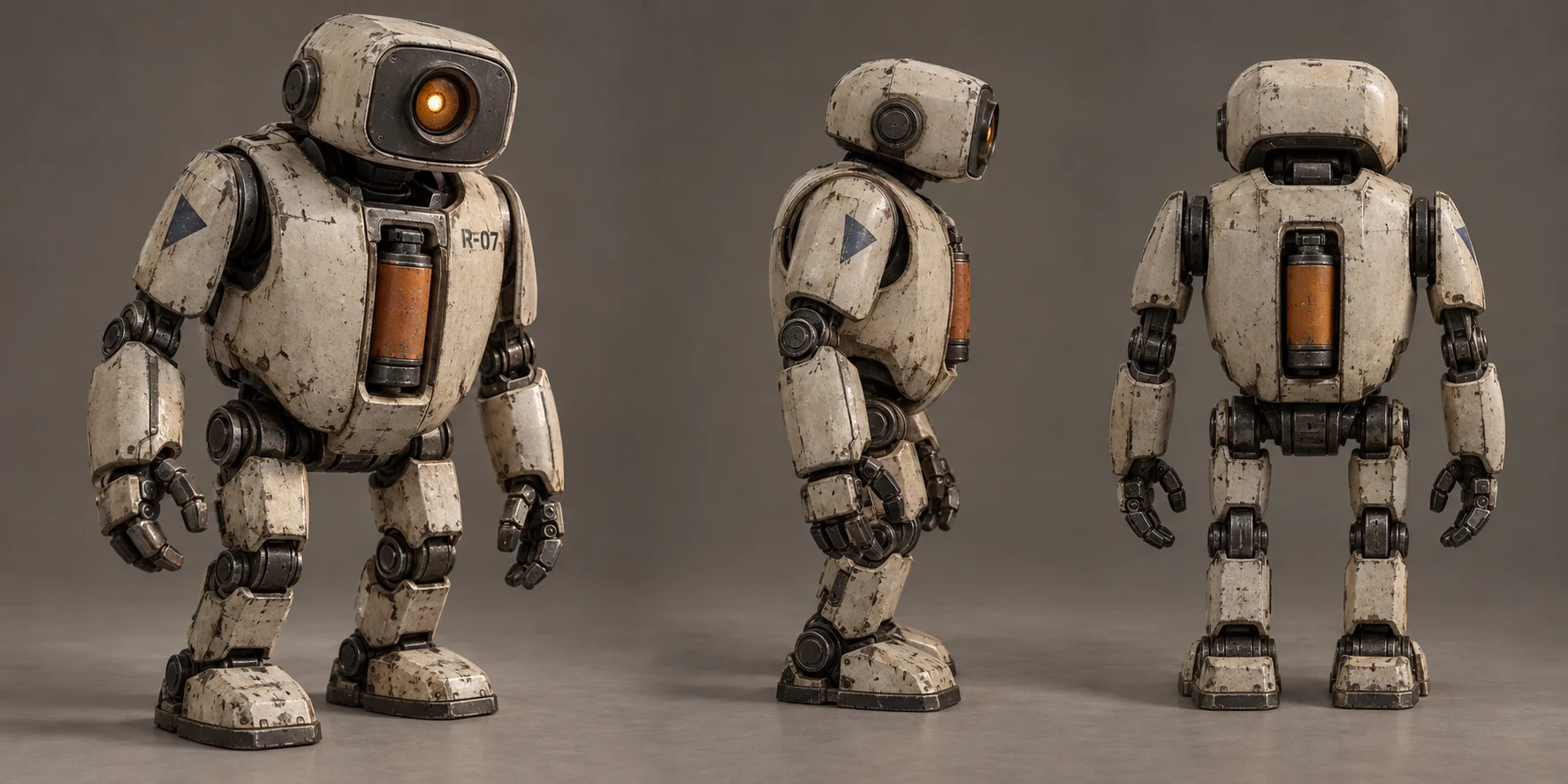
R-07 character reference. The silhouette, surface wear, single eye, shoulder marking, and chest cartridge form the visual identity carried into the scene keyframes.
The turnaround became a reference for scene generation. Later keyframes also referenced earlier scenes, carrying the greenhouse layout, lighting, and prop design forward.
The most important continuity rules were simple:
- Only one orange cartridge exists.
- After removal, the robot's chest stays empty.
- After shutdown, the optical eye stays dark.
- The years-later scene preserves the robot's seated pose and the greenhouse composition.
These rules make the sacrifice legible. A battery reappearing in the chest or an eye lighting up again would change the meaning of the ending.
Approve the keyframes before asking for motion
We developed nine scene keyframes, then revised three compositions during the retake process. This gave us a way to inspect the character, staging, and narrative state separately from motion.
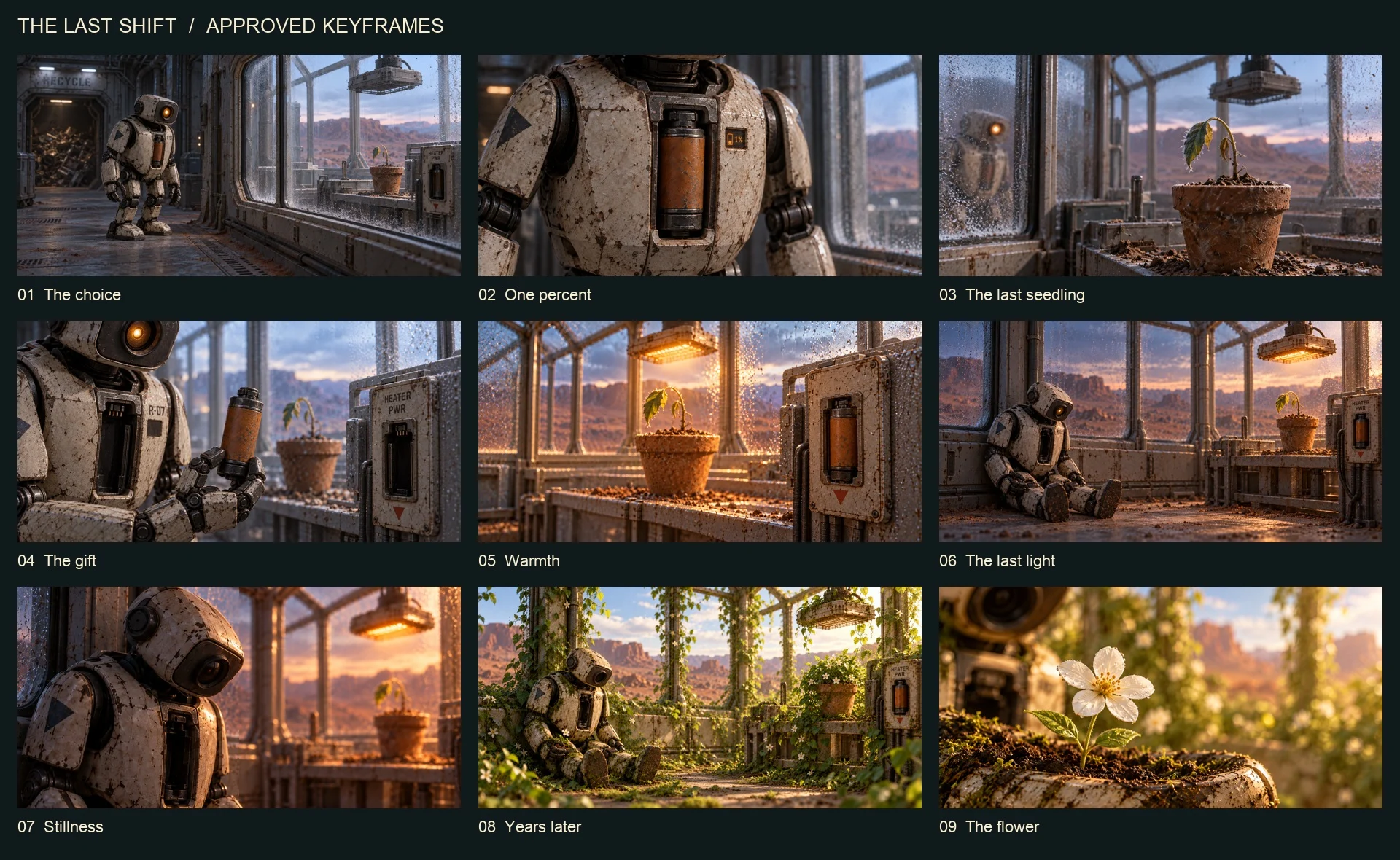
The nine selected keyframes, in story order. These are still-image inputs, rather than nine frames sampled from a single generated video.
The motion prompts were deliberately restrained: a slow camera push, a slight head movement, drifting dust, trembling leaves. Each shot had one visual task. We avoided asking a short generation to perform an entire sequence of actions.
For example, the battery insert uses this prompt excerpt:
A pure cinematic macro insert of the orange power cartridge seated in the worn ivory robot chest. Extremely slow straight camera push only. Robot stays completely motionless. Both hands remain outside frame throughout.
The image provides the composition. The prompt specifies the limited change that should occur over time.
Connect ComfyUI to Rapid MLX
ComfyUI handled the workflow; Rapid-MLX handled video inference. The custom node took one ComfyUI image tensor, encoded it as a PNG reference, submitted a video job, and returned a ComfyUI VIDEO object for SaveVideo. Generated audio stayed attached to the clip.
Story and continuity rules
           |
           v
Built-in image generation (separate tool)
  Robot turnaround -> Scene keyframes
           |
           v
ComfyUI
  LoadImage -> RapidMLXLastShift -> SaveVideo
                      |
                      v
             Rapid-MLX video API
                      |
                      v
           LTX-2.5 / MLX Q8 distilled
           Apple M4 Pro / 48 GiB
                      |
                      v
          Review -> Retake -> Select
                      |
                      v
             FFmpeg editorial
          Timing, interpolation, scaling
          English graphics, music, sound
                      |
                      v
              30-second final film
Each native clip used the same geometry and frame rate:
{
  "model": "ltx-2.5-mlx-q8",
  "size": "1024x512",
  "frames": 65,
  "fps": 24,
  "seed": 90102
}
The request also included a motion prompt and the PNG as input_reference. Each native clip contained approximately 2.71 seconds of footage.
The asynchronous API flow was:
POST /v1/videos
       |
       v
Persist accepted job ID and request fingerprint
       |
       v
GET /v1/videos/{id} until completed
       |
       v
GET /v1/videos/{id}/content
       |
       v
Save MP4 and its SHA-256 digest
Persisting the receipt mattered on a long-running worker. An identical rerun could resume polling a known job, and an already downloaded clip was checked against its recorded hash before reuse. If the initial submission lost its response, the client required inspecting server jobs before submitting again.
Retake the composition when motion breaks the shot
Thirteen video jobs produced the nine selected clips. Four takes were rejected: two battery close-ups with changing finger geometry, a heater shot obscured by a foreground arm, and a closing shot that introduced additional hand geometry.
The fix was to change what the camera needed to see.
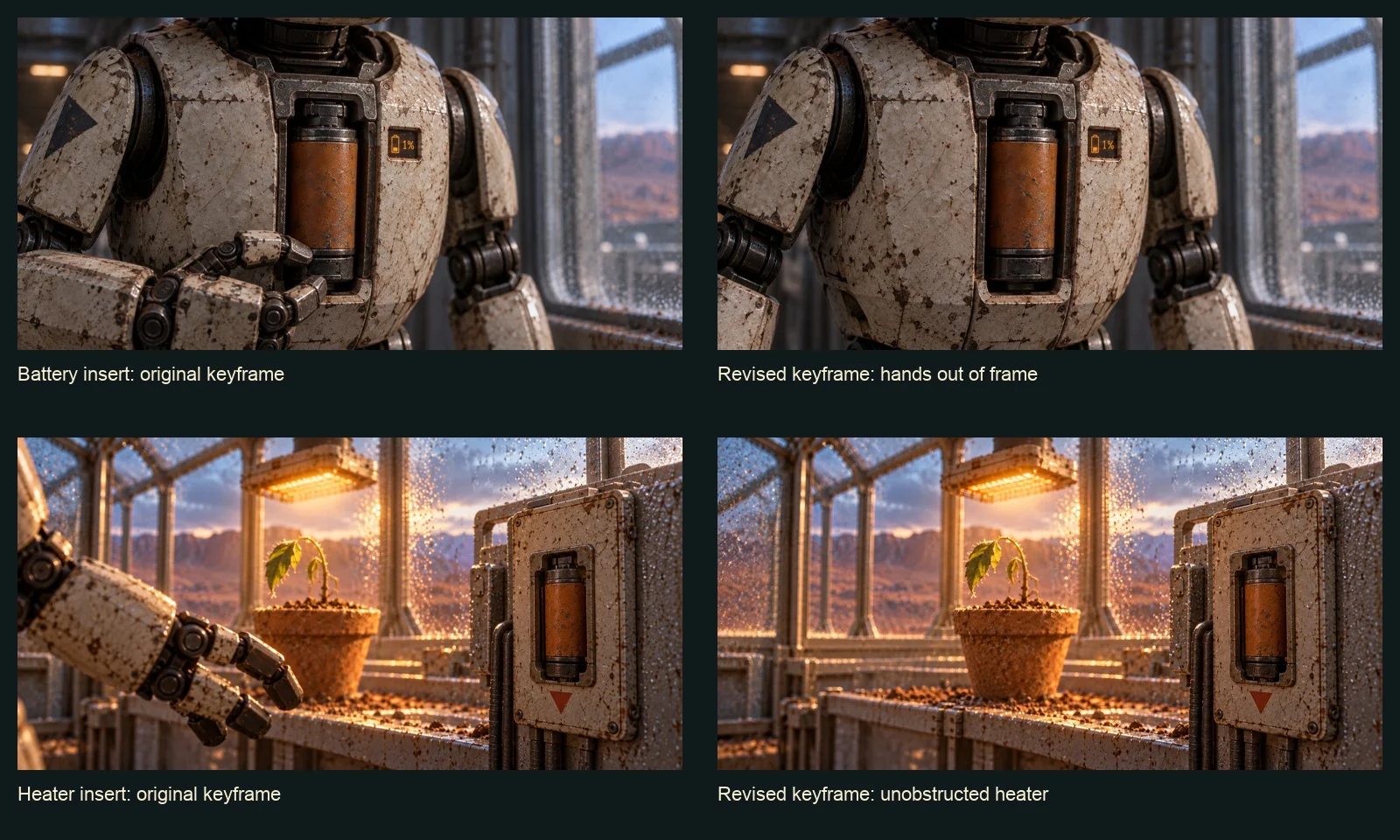
Original and revised still-image inputs. The battery insert removes hands from the frame; the heater insert removes the foreground robot. The rejected defects occurred during motion generation.
The battery close-up only needed to communicate low power, so hands were unnecessary. The heater insert needed to show the installed cartridge and returning warmth, so the foreground arm was unnecessary. The flower macro was tightened until fingertips and joints were outside the frame.
This preserved the story while reducing the geometry the model had to maintain. We reviewed start, middle, and end frames for each selected take, checking identity, prop count, chest state, eye state, and the intended action.
Build the final rhythm in the edit
Nine native clips did not automatically make a finished film. The renderer assigned explicit durations, retimed the footage, used motion-compensated interpolation, and added a brief hold at the end of the closing shot.
The edit contains exactly 720 frames at 24 fps, giving a 30.000-second delivery.
Native generation was 1024×512. FFmpeg scaled the image to 1920×960, then placed it inside a 1920×1080 frame with letterboxing. The master is a 1080p delivery derived from lower-resolution inference; it is an editorial upscale.
We added four pieces of English text in post:
MARS · ABANDONED OUTPOST
POWER REMAINING: 1%
YEARS LATER
THE LAST SHIFT
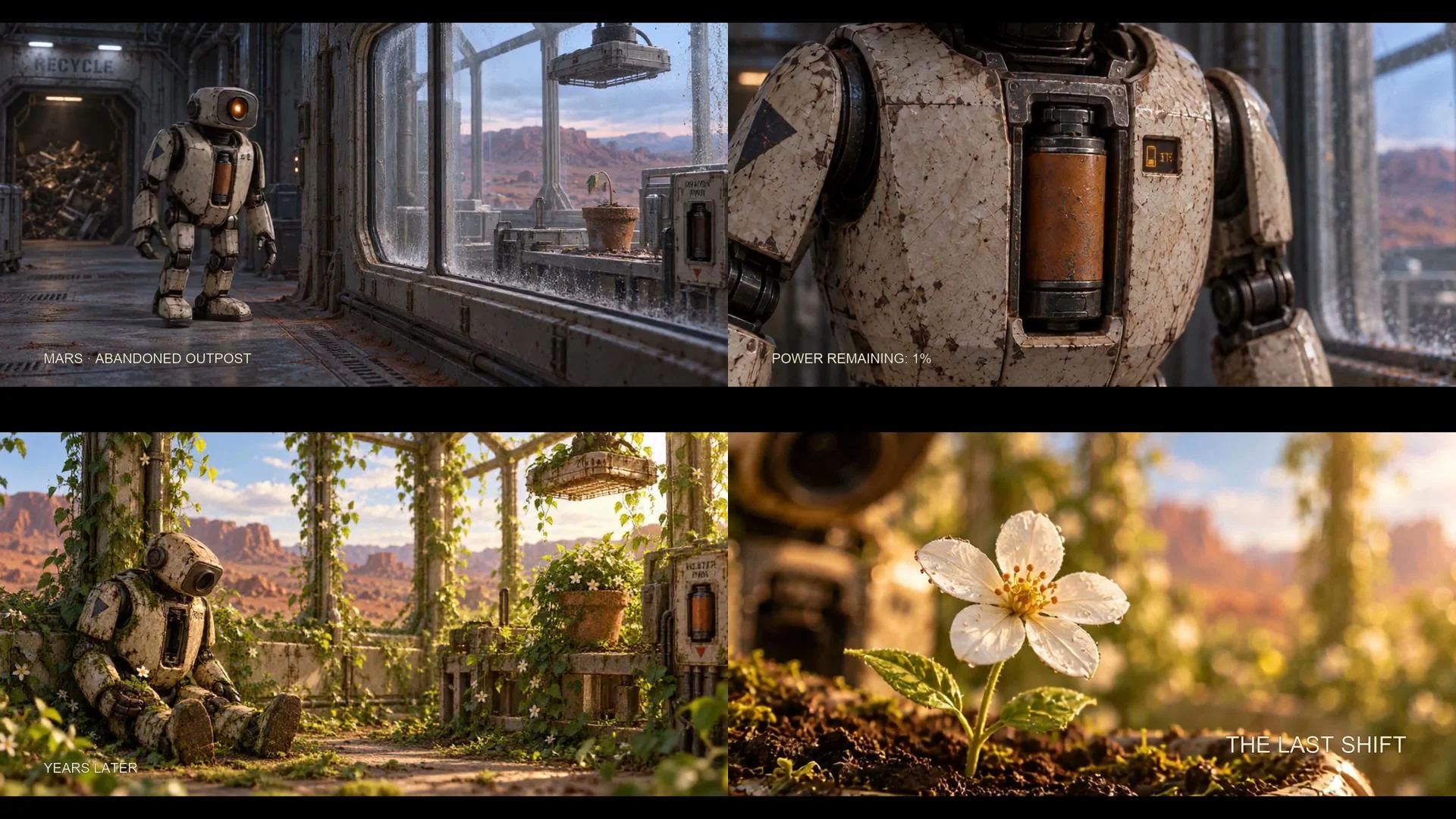
Typeset graphics from the English export. Critical story information remains readable independently of small generated lettering on props.
Keeping typography in the renderer made the language revision straightforward: change four strings and re-export using the existing selected shots. No video inference or new worker lease was required.
Give the shots a continuous sound world
The soundtrack combines quiet native clip audio with an original sparse piano cue and synthesized warning, relay, and shutdown effects.
The piano was rendered offline through AVFoundation using a bundled macOS instrument. The effects were synthesized in code. No separate music-generation model was used. Continuous music, short fades, and a controlled mix connected the individual shots into one scene.
Keep the production reproducible
The production source includes the character briefs, motion prompts, ComfyUI workflow, custom node, asynchronous client, music and sound code, renderer, and verification notes. Media is maintained separately from the source tree.
With the approved clips and audio assets available, the English master can be rebuilt from the example directory:
python render.py \
  --input media/approved/shots \
  --score media/score.wav \
  --sound media/sound.wav \
  --output media/final-en/the-last-shift-en.mp4
The recorded inference baseline used Rapid-MLX 146a9a5c6, ComfyUI 0df64eb242b7c5759c3e86afd5d1846d923b1033, and LTX runtime 57952288076766abe27dda3a774b2c24f7346977. The model revision was f1b56e7dc89f71a9af2cddac787b89ed22a8b7fc.
The selected source clips and English master passed full decoding checks. Per-shot receipts, source hashes, final stream metadata, and review images preserve the connection between the selected takes and the finished edit.
For another ComfyUI project, see our imaginary travel posters made with Rapid-MLX image generation. That project makes still images; this one uses separate still-image inputs and Rapid-MLX for video.
The production shows a practical division of work: establish identity in still images, generate controlled motion on the M4, then use editing and sound to shape the viewer's attention. R-07's story works when the audience can follow one cartridge from its chest to the heater—and understand why its eye never lights up again.
rapid-mlx serve <alias> serves any model on
localhost:8000/v1.
curl -fsSL https://rapidmlx.com/install.sh | bash
New models and speedups, in your inbox
A short note whenever Rapid-MLX gets faster or adds models worth running on your Mac. No spam — unsubscribe anytime.