An AI Scientist on a Mac: Auto Research with DeepScientist and Rapid-MLX, Fully Local
One research question, one Mac, no cloud model. The AI research agent wrote the code, ran the experiments, rejected its own hypothesis and wrote the report. We stepped in once.
When an AI model says it is 99% sure, is it right 99% of the time? That property is called calibration. A popular training trick, label smoothing, is supposed to improve it by stopping models from becoming overconfident.
We gave that question to an AI research agent and let it do the research on its own: auto research, from code to report. The agent was DeepScientist, an open-source "AI scientist" with a visual research pipeline. The model was Qwen3.6-27B, running on a Mac through Rapid-MLX. No cloud model, no API key, and the data, code and results never left the machine.
The whole run in 39 seconds (sound on). The voiceover is Kokoro text-to-speech, also served by Rapid-MLX. Download the MP4.
Why run an AI research assistant locally
The most useful thing an AI can help a researcher with is unpublished work: drafts, data, half-formed ideas. That is exactly the material many researchers would rather not upload to someone else's server. A local research agent lets you use AI on that work while it stays on your own machine.
You can still go online. Search the literature, read papers, call a cloud model for general knowledge. But the drafts, the data and the experiments stay yours.
The setup
| Piece | What we used |
|---|---|
| Research agent | DeepScientist 1.6.0 (open source), OpenCode runner |
| Agent runtime | OpenCode 1.19.5 with an OpenAI-compatible provider |
| Inference engine | Rapid-MLX serving unsloth/Qwen3.6-27B-MLX-8bit |
| Hardware | Mac Studio, Apple M3 Ultra |
| Network | Local only; the agent's model calls went to 127.0.0.1 |
DeepScientist does not talk to the model server directly. It drives a coding-agent runner, here OpenCode, and the runner talks to Rapid-MLX over the OpenAI-compatible API. So any Mac that can run a strong enough local model can run the whole stack.
What the agent did
DeepScientist splits research into stages and shows them as a graph you can click into: baseline, experiment, idea, decision, write-up. Each node holds its own code, results and notes.

On its own, the local agent:
- Read its brief and recovered the project state.
- Wrote a self-contained experiment: a two-layer MLP on the scikit-learn digits dataset, trained with plain cross-entropy and with label smoothing at 0.05 and 0.1, three seeds each.
- Measured accuracy and Expected Calibration Error (ECE, 15 bins) and drew reliability diagrams.
- Recorded the baseline, the main experiment and a decision as durable artifacts.
- Wrote a short report with method, results table, discussion and limitations.
Every tool call is shown live in the side panel, so you can see what it ran and what came back.
The human in the loop
The agent got stuck once. The Python environment we pointed it to was missing scikit-learn, and it started looking for ways to install packages. We installed the package ourselves and left a one-line note in the chat. The agent read the note, switched to the right interpreter and moved on.
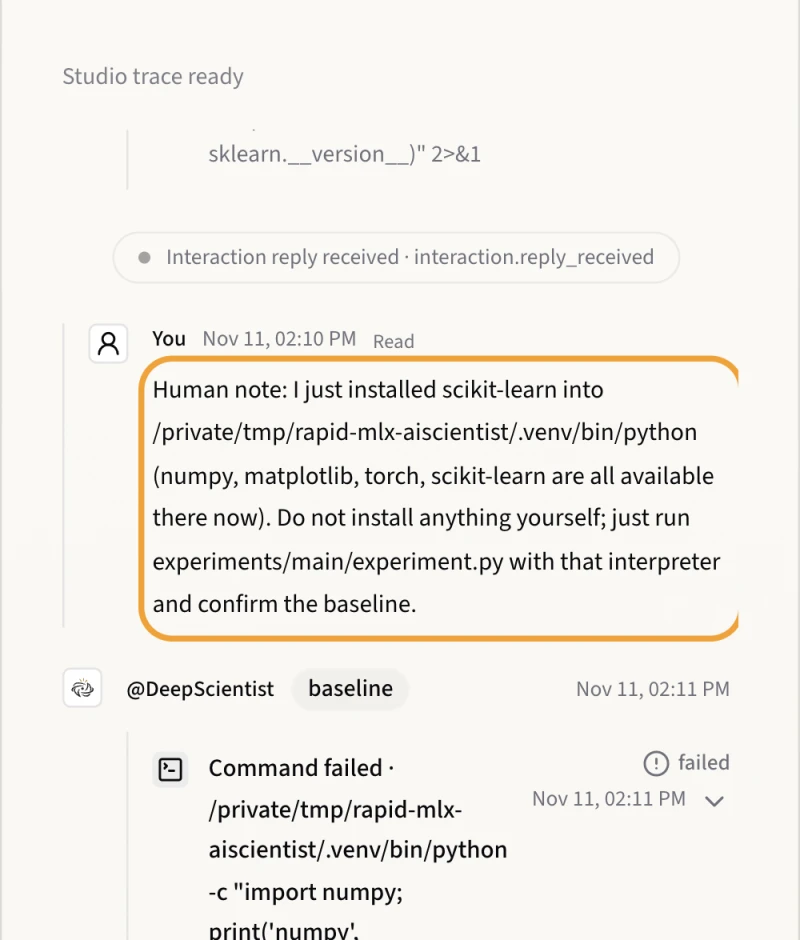
This is the point of a visual pipeline. A local model is smaller than a frontier cloud model, so it will sometimes go off track. When you can see every step, a ten-second nudge is enough to get it back.
The result: the trick backfired
| Configuration | Accuracy (mean ± std) | ECE (mean ± std) |
|---|---|---|
| Cross-entropy (baseline) | 0.891 ± 0.033 | 0.253 ± 0.019 |
| Label smoothing ε = 0.05 | 0.892 ± 0.034 | 0.292 ± 0.020 |
| Label smoothing ε = 0.10 | 0.892 ± 0.033 | 0.332 ± 0.022 |
Label smoothing left accuracy unchanged and made calibration worse, at every strength and for every seed. The agent rejected its own hypothesis and recorded the decision.
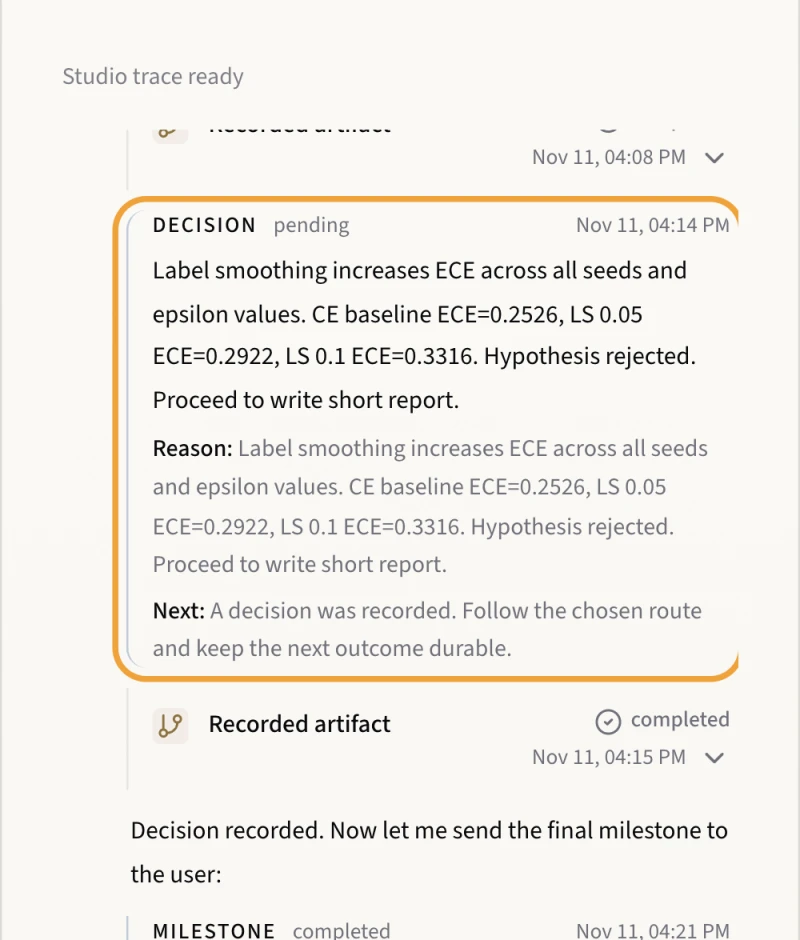
The reliability diagrams show why. The bars sit above the diagonal: the model is right more often than its confidence suggests, so it is already under-confident. Label smoothing pushes confidence down further. That matches the published picture: label smoothing helps over-confident models, and it can hurt models that are not (Müller et al., 2019).
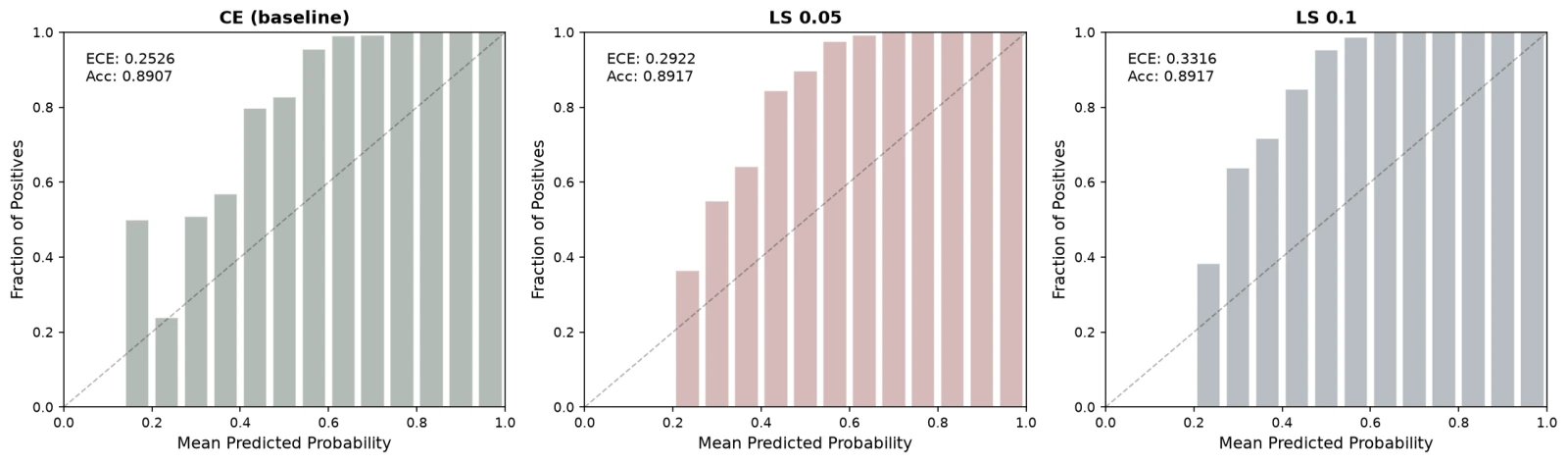
A human reviewer would push further. The baseline is undertrained for digits (89% accuracy where about 97% is typical), so the natural next step is to train it properly and rerun the comparison. That is one more chat message to the same agent.
How to run an AI research agent locally on your Mac
This is the exact setup we used. Follow it top to bottom and you will have the same local AI scientist running on your Mac.
What you need
| Requirement | Notes |
|---|---|
| Apple Silicon Mac | We used a Mac Studio (M3 Ultra). The 8-bit 27B model needs about 30 GB for its weights, so plan for 48 GB of memory or more. On smaller Macs, use a 4-bit build of the same model. |
| Node.js | For DeepScientist and OpenCode. We used Node 22. |
| Git, with a name and email set | DeepScientist keeps each research project in a git repository. ds doctor fails if git config user.name is empty. |
| uv | DeepScientist uses it to manage its own Python 3.11+ runtime. Install it from astral.sh/uv. |
1 · Serve a local model with Rapid-MLX
curl -fsSL https://rapidmlx.com/install.sh | bash
rapid-mlx serve unsloth/Qwen3.6-27B-MLX-8bit --port 8461 --served-model-name rapid-local
The first run downloads the model. Leave this terminal open. In a second terminal, check that the OpenAI-compatible API is up:
curl -s http://127.0.0.1:8461/v1/models
You should see rapid-local in the list. --served-model-name gives the model a short, stable name, so the agent config below does not depend on the Hugging Face repo name.
2 · Install OpenCode and point it at Rapid-MLX
DeepScientist does not call the model itself. It drives a coding-agent runner, and OpenCode is the runner that accepts any OpenAI-compatible server.
npm install -g opencode-ai@1.19.5
Create ~/.config/opencode/opencode.json:
{
  "provider": {
    "rapid-mlx": {
      "npm": "@ai-sdk/openai-compatible",
      "name": "Rapid-MLX (local)",
      "options": { "baseURL": "http://127.0.0.1:8461/v1", "apiKey": "local" },
      "models": { "rapid-local": { "name": "Qwen3.6-27B (local)" } }
    }
  },
  "model": "rapid-mlx/rapid-local"
}
The apiKey can be any string; Rapid-MLX does not check it on localhost. Test the connection before going further:
opencode run --model rapid-mlx/rapid-local "Reply with exactly HELLO"
If this prints HELLO, the runner and the model can talk.
3 · Install DeepScientist
npm install -g @researai/deepscientist@1.6.0
4 · Use Rapid-MLX 1.0.3 or newer (dotted tool names)
DeepScientist's prompts refer to its tools with dots, such as artifact.get_quest_state. OpenCode registers the same tools with underscores, such as artifact_get_quest_state. Frontier cloud models quietly translate between the two. A local model copies the prompt literally and calls a tool name that was never declared. On Rapid-MLX 1.0.2 and earlier, that call was dropped and the turn stopped after one sentence.
Rapid-MLX 1.0.3 fixes this (#5786). When a model calls an undeclared tool name that differs from exactly one declared tool only by . or / versus _, Rapid-MLX maps the call to that tool. Exact names always win, and ambiguous names are never guessed. We re-ran DeepScientist with its original, unmodified prompts against 1.0.3: every tool call on the first turn went through.
Check your version, and upgrade if it is older than 1.0.3:
rapid-mlx --version
rapid-mlx upgrade
No change to DeepScientist is needed.
On Rapid-MLX 1.0.2 or earlier
If you cannot upgrade, rewrite the dotted names in DeepScientist's prompt and skill files, keeping a backup first. Do this before you create a research project, and again after any ds update.
DS="$(npm root -g)/@researai/deepscientist/src"
tar czf ~/deepscientist-prompts-backup.tgz -C "$DS" prompts skills
grep -rlE '\b(artifact|memory|bash_exec)\.[a-z_]+' "$DS/prompts" "$DS/skills" \
  | xargs perl -pi -e 's/\b(artifact|memory|bash_exec)\.([a-z_]+[a-z])\b/$1_$2/g'
5 · Give the agent a ready Python environment
A local agent can lose a lot of time trying to install packages. Prepare an environment with what the experiment needs, and name it in the research brief:
uv venv ~/ds-env -p 3.11
uv pip install --python ~/ds-env/bin/python numpy scikit-learn matplotlib
Our first run skipped this step for scikit-learn. That is where the human note in the timeline above came from.
6 · Check the setup
ds doctor --runner opencode
Every check should pass. LaTeX is optional: without pdflatex, DeepScientist still writes the report as Markdown and only skips the PDF build.
7 · Start DeepScientist with the OpenCode runner
ds --runner opencode --host 127.0.0.1 --port 20999
This starts the local web app and opens http://127.0.0.1:20999 in your browser. --host 127.0.0.1 keeps it reachable only from your own machine. Pass --runner opencode on every launch, or set default_runner: opencode in config/config.yaml under your DeepScientist home directory.
8 · Create a research project and start it
You can create a project (DeepScientist calls it a quest) from the web app, or from the command line. This is the brief we used:
ds new "Small, CPU-only study (finish within ~1 hour): does label smoothing \
improve probability calibration of a small MLP classifier on the scikit-learn \
digits dataset? Baseline: MLP trained with plain cross-entropy. Variant: label \
smoothing 0.1 (and optionally 0.05, 0.2). Measure test accuracy and Expected \
Calibration Error (15 bins), 3 seeds each, plot a reliability diagram, and \
write a short report. Use only numpy/scikit-learn/matplotlib from \
~/ds-env/bin/python; do not install packages." \
  --quest-id label-smoothing-calibration
Open the project in the web app and send one chat message to start, for example "Please start. Keep it small and CPU-only."
Write the brief the way you would for a new student: say what to compare, how to measure it, how big the job should be, and which tools to use. A small local model follows a concrete brief much better than an open-ended one.
9 · Watch, step in, collect the results
- The canvas shows each stage as a node: baseline, experiment, idea, decision, write-up. Click a node to see its code, results and notes.
- The side panel streams every tool call as it happens: the commands the agent runs, the files it writes, and what came back.
- To step in, type in the chat. The agent reads your message on its next turn. A short, specific note works best, such as "scikit-learn is installed in ~/ds-env now; use that interpreter."
- The outputs are ordinary files in the project's git repository under your DeepScientist home, in
quests/<quest-id>/. Ours producedexperiments/main/experiment.py,results.json,reliability_diagram.pngandpaper/report.md.
When you are done, stop the background service with ds --stop, then stop rapid-mlx serve with Ctrl-C.
Troubleshooting
| Symptom | Cause and fix |
|---|---|
| The first turn ends after one sentence and no tool runs | The dotted tool names from step 4. The Rapid-MLX log shows the model called 'artifact.…', which this request did not declare. Upgrade to Rapid-MLX 1.0.3 or newer, then start a new project. |
ds doctor fails on Git |
Set git config --global user.name and user.email. |
| The agent keeps trying to install packages | Give it a ready interpreter (step 5) and name the path in the brief. |
| Turns get slow as the project grows | The agent's context grows to tens of thousands of tokens. Keep the model server dedicated to one agent, and keep the brief small. |
opencode run cannot reach the model |
Check that rapid-mlx serve is still running and that baseURL ends in /v1. |
Frequently asked questions
What is auto research?
Auto research (automated AI research) means an AI agent carries out the research loop itself: it reads the brief, writes the experiment code, runs it, analyzes the results, decides whether the hypothesis holds and writes the report. A human sets the question and can step in at any point. In this post, DeepScientist ran that whole loop on one Mac.
Can I run an AI research agent fully locally on a Mac?
Yes. DeepScientist drives a coding-agent runner (OpenCode), and OpenCode talks to Rapid-MLX over the OpenAI-compatible API on 127.0.0.1. The model, the agent, the experiments and the report all stay on your Mac. No API key or cloud model is needed.
Which model should I use for local auto research?
We used Qwen3.6-27B in 8-bit (unsloth/Qwen3.6-27B-MLX-8bit), which needs about 30 GB for its weights, so a Mac with 48 GB of memory or more. On smaller Macs, use a 4-bit build of the same model. The agent relies heavily on tool calls, so pick a model with strong tool calling.
Does my research data leave my Mac?
Not for the model calls: they go to Rapid-MLX on localhost. Your drafts, data, code and results stay on the machine. You can still let the agent search the web or read papers online if you choose; the model and your unpublished work stay local.
How long does a local auto research run take?
Our study took about four hours of wall time on a Mac Studio (M3 Ultra), with the same model also serving a second agent. A smaller brief and a model server dedicated to one agent make it faster.
Can I use other open-source AI research agents with Rapid-MLX?
Any research agent or coding agent that accepts an OpenAI-compatible base URL can point at Rapid-MLX. We verified DeepScientist with the OpenCode runner end to end, as shown above. Rapid-MLX 1.0.3 and newer also handle agents whose prompts write tools as server.tool while the client registers server_tool.
Is it free?
Yes. DeepScientist (Apache-2.0), OpenCode and Rapid-MLX are open source, and the model weights are open. Once installed, a run has no per-token cost.
Limits
- This is a small, known effect on a small dataset. It was chosen because it gives a clear, checkable answer.
- The run took about four hours of wall time. DeepScientist's working context grew to roughly 90k tokens, and the same local model was serving a second agent at the same time.
- The agent's report lists the wrong Python interpreter in its reproducibility notes, which a reviewer would correct.
None of this needed a cloud model. One Mac served the model, ran the agent, ran the experiments and produced the report.
rapid-mlx serve <alias> serves any model on
localhost:8000/v1.
curl -fsSL https://rapidmlx.com/install.sh | bash
New models and speedups, in your inbox
A short note whenever Rapid-MLX gets faster or adds models worth running on your Mac. No spam — unsubscribe anytime.